Cách Tạo Landing Page Bằng AI Với Kiro IDE: Hướng Dẫn Từng Bước
Hướng dẫn tạo landing page đẹp, responsive bằng Kiro IDE và AI, đi từ PRD, prompt thiết kế đến triển khai thực tế cho người không chuyên code.
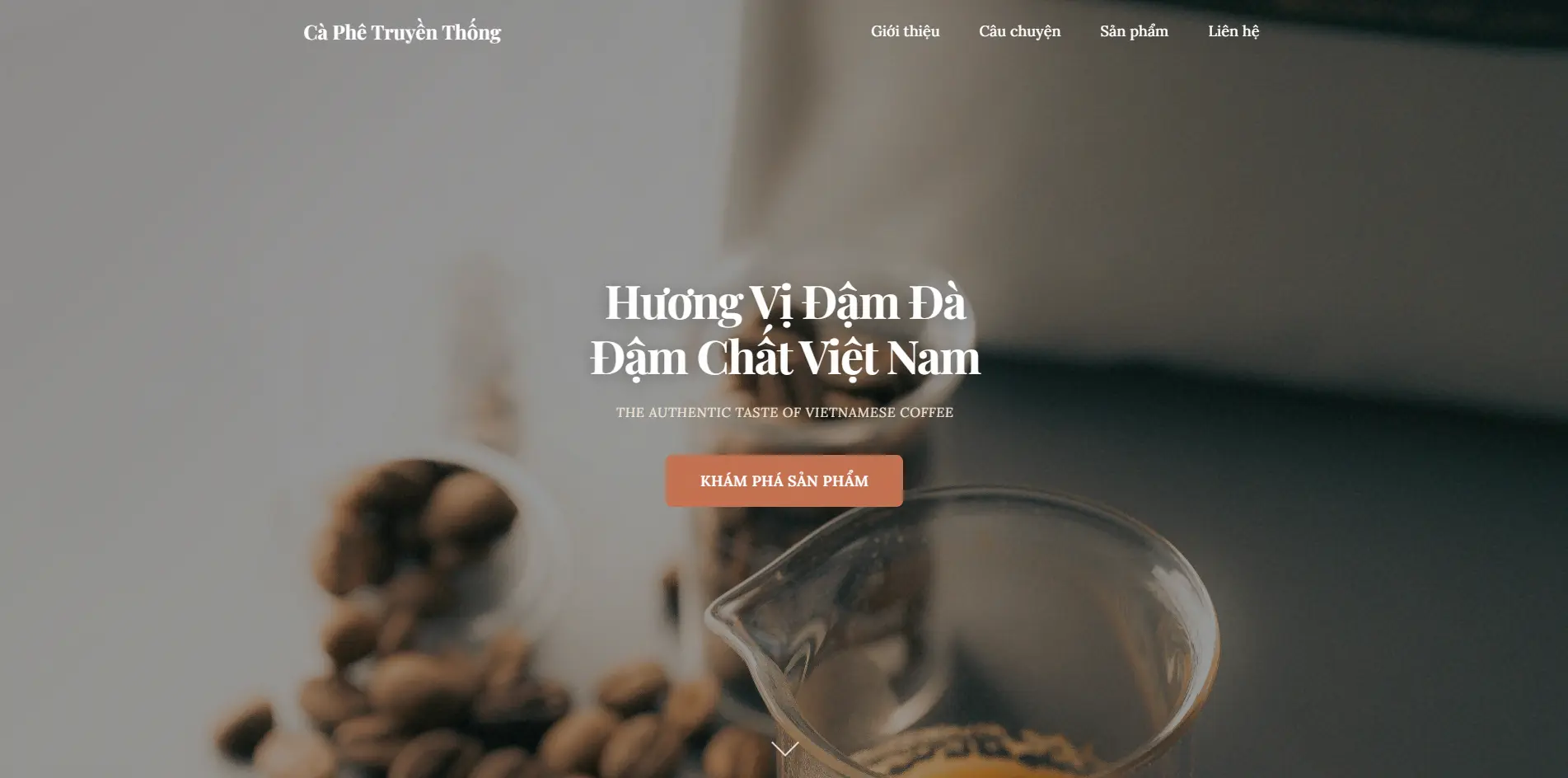
Bạn có bao giờ nghĩ rằng mình có thể tạo ra một website đẹp mắt, chuyên nghiệp mà không cần biết code? Kiro IDE - công cụ AI hỗ trợ lập trình thông minh - giúp bạn biến ý tưởng thành sản phẩm hoàn chỉnh chỉ trong vài giờ.
Kết quả đạt được
Trước khi đi vào chi tiết, hãy xem kết quả cuối cùng - một landing page cho thương hiệu cà phê truyền thống Việt Nam với đầy đủ tính năng:
- Hero section với slideshow hình ảnh chuyển đổi mượt mà
- Phần giới thiệu câu chuyện thương hiệu
- Slider sản phẩm tương tác đẹp mắt
- Form liên hệ với validation
- Responsive trên mọi thiết bị
- Animation tinh tế và chuyên nghiệp
Tại sao chọn Kiro IDE?
Kiro IDE khác biệt so với các công cụ AI khác ở chỗ:
- Specs System: Quy trình phát triển có cấu trúc với Requirements → Design → Tasks
- Incremental Development: Phát triển từng bước, kiểm soát được kết quả
- Production-grade Code: Code được tạo ra có chất lượng cao, sẵn sàng deploy
- Credit System: 50-100 credit đủ để tạo một website hoàn chỉnh
Quy trình 7 bước tạo Landing Page
Bước 1: Chuẩn bị PRD (Product Requirements Document)
Trước khi bắt đầu, bạn cần mô tả rõ ràng sản phẩm muốn xây dựng. Sử dụng ChatGPT hoặc Claude để tạo file PRD với các nội dung:
- Mục tiêu cốt lõi: Website giới thiệu thương hiệu cà phê
- Đối tượng người dùng: Khách hàng yêu thích cà phê truyền thống
- USP (Unique Selling Points): Cà phê rang xay thủ công, hương vị đậm đà
- Danh sách sản phẩm: Robusta, Arabica, Blend đặc biệt...
- Yêu cầu chức năng: Hero, About, Products, Contact
Mẹo: Mô tả càng chi tiết, AI sẽ hiểu rõ hơn và tạo ra sản phẩm phù hợp với mong muốn của bạn.
Bước 2: Tạo Prompt hướng dẫn thiết kế
Để website có thiết kế độc đáo, không bị "AI slop" (thiết kế generic, nhàm chán), sử dụng prompt sau:
# FRONTEND DESIGN EXPERT - SYSTEM INSTRUCTIONS

Create distinctive, production-grade frontend interfaces with high design quality. Use this skill when the user asks to build web components, pages, or applications. Generates creative, polished code that avoids generic AI aesthetics.

This skill guides creation of distinctive, production-grade frontend interfaces that avoid generic "AI slop" aesthetics. Implement real working code with exceptional attention to aesthetic details and creative choices.

The user provides frontend requirements: a component, page, application, or interface to build. They may include context about the purpose, audience, or technical constraints.

## Design Thinking

Before coding, understand the context and commit to a BOLD aesthetic direction:
- **Purpose**: What problem does this interface solve? Who uses it?
- **Tone**: Pick an extreme: brutally minimal, maximalist chaos, retro-futuristic, organic/natural, luxury/refined, playful/toy-like, editorial/magazine, brutalist/raw, art deco/geometric, soft/pastel, industrial/utilitarian, etc.
- **Constraints**: Technical requirements (framework, performance, accessibility).
- **Differentiation**: What makes this UNFORGETTABLE? What's the one thing someone will remember?

**CRITICAL**: Choose a clear conceptual direction and execute it with precision. Bold maximalism and refined minimalism both work - the key is intentionality, not intensity.

Then implement working code (HTML/CSS/JS, React, Vue, etc.) that is:
- Production-grade and functional
- Visually striking and memorable
- Cohesive with a clear aesthetic point-of-view
- Meticulously refined in every detail

## Frontend Aesthetics Guidelines

Focus on:
- **Typography**: Choose fonts that are beautiful, unique, and interesting. Avoid generic fonts like Arial and Inter; opt instead for distinctive choices that elevate the frontend's aesthetics; unexpected, characterful font choices.
- **Color & Theme**: Commit to a cohesive aesthetic. Use CSS variables for consistency. Dominant colors with sharp accents outperform timid, evenly-distributed palettes.
- **Motion**: Use animations for effects and micro-interactions. Prioritize CSS-only solutions for HTML. Focus on high-impact moments: one well-orchestrated page load with staggered reveals creates more delight than scattered micro-interactions.
- **Spatial Composition**: Unexpected layouts. Asymmetry. Overlap. Diagonal flow. Grid-breaking elements. Generous negative space OR controlled density.
- **Backgrounds & Visual Details**: Create atmosphere and depth rather than defaulting to solid colors. Add contextual effects and textures that match the overall aesthetic.

NEVER use generic AI-generated aesthetics like overused font families (Inter, Roboto, Arial, system fonts), cliched color schemes (particularly purple gradients on white backgrounds), predictable layouts and component patterns, and cookie-cutter design that lacks context-specific character.

Interpret creatively and make unexpected choices that feel genuinely designed for the context. No design should be the same. Vary between light and dark themes, different fonts, different aesthetics. NEVER converge on common choices across generations.

**IMPORTANT**: Match implementation complexity to the aesthetic vision. Maximalist designs need elaborate code with extensive animations and effects. Minimalist or refined designs need restraint, precision, and careful attention to spacing, typography, and subtle details.
Prompt này giúp AI tạo ra thiết kế có cá tính, tránh những pattern nhàm chán thường thấy.
Bước 3: Tạo Spec trong Kiro IDE
Trong Kiro IDE, sử dụng tính năng Specs để tổ chức quy trình phát triển:
- Mở Command Palette (Ctrl+Shift+P)
- Tìm "Kiro: Create New Spec"
- Paste nội dung PRD và prompt thiết kế
- Để AI tạo Requirements (theo chuẩn EARS)
- Tiếp tục tạo Design (kiến trúc, components)
- Cuối cùng tạo Tasks (danh sách công việc)
Bước 4: Thực thi từng Task
Sau khi có danh sách tasks, click "Start task" để AI bắt đầu code. Kiro sẽ tự động:
- Tạo cấu trúc HTML semantic
- Viết CSS với design tokens (biến CSS)
- Thêm JavaScript cho tương tác
- Tạo tests tự động đảm bảo chất lượng
Lưu ý: Thực hiện từng task một, kiểm tra kết quả trước khi chuyển sang task tiếp theo.
Bước 5: Tìm và thêm hình ảnh
Đây là bước quan trọng vì AI không thể tạo hình ảnh thực tế. Bạn cần tự tìm và thêm hình ảnh phù hợp.
Nguồn hình ảnh miễn phí chất lượng cao:
- Unsplash - Hình ảnh chất lượng cao, miễn phí thương mại
- Pexels - Đa dạng chủ đề, có cả video
- Pixabay - Hơn 2 triệu hình ảnh miễn phí
- Freepik - Có cả vector và PSD
Từ khóa tìm kiếm gợi ý (cho website cà phê):
- "Vietnamese coffee" - Cà phê Việt Nam
- "Coffee beans roasting" - Rang hạt cà phê
- "Phin coffee filter" - Phin cà phê
- "Barista pouring coffee" - Pha chế cà phê
Bước 6: Yêu cầu AI cập nhật hình ảnh
Sau khi tải hình ảnh về thư mục image/, yêu cầu AI cập nhật:
"Tôi vừa thêm các hình ảnh sau vào thư mục image/:
- coffee-hero.jpg - cho hero section
- robusta.jpg - cho sản phẩm Robusta
Hãy cập nhật HTML để sử dụng các hình ảnh này."
AI sẽ tự động cập nhật đường dẫn trong code.
Bước 7: Tinh chỉnh và hoàn thiện
Sau khi có website cơ bản, yêu cầu AI điều chỉnh theo ý muốn:
- Màu sắc: "Đổi màu hover sang cam đậm hơn"
- Font size: "Tăng kích thước chữ menu"
- Layout: "Đổi thứ tự menu thành: Giới thiệu, Câu chuyện, Sản phẩm, Liên hệ"
- Animation: "Thêm slideshow cho hero section với 4 hình ảnh"
Kết quả chi tiết từng section
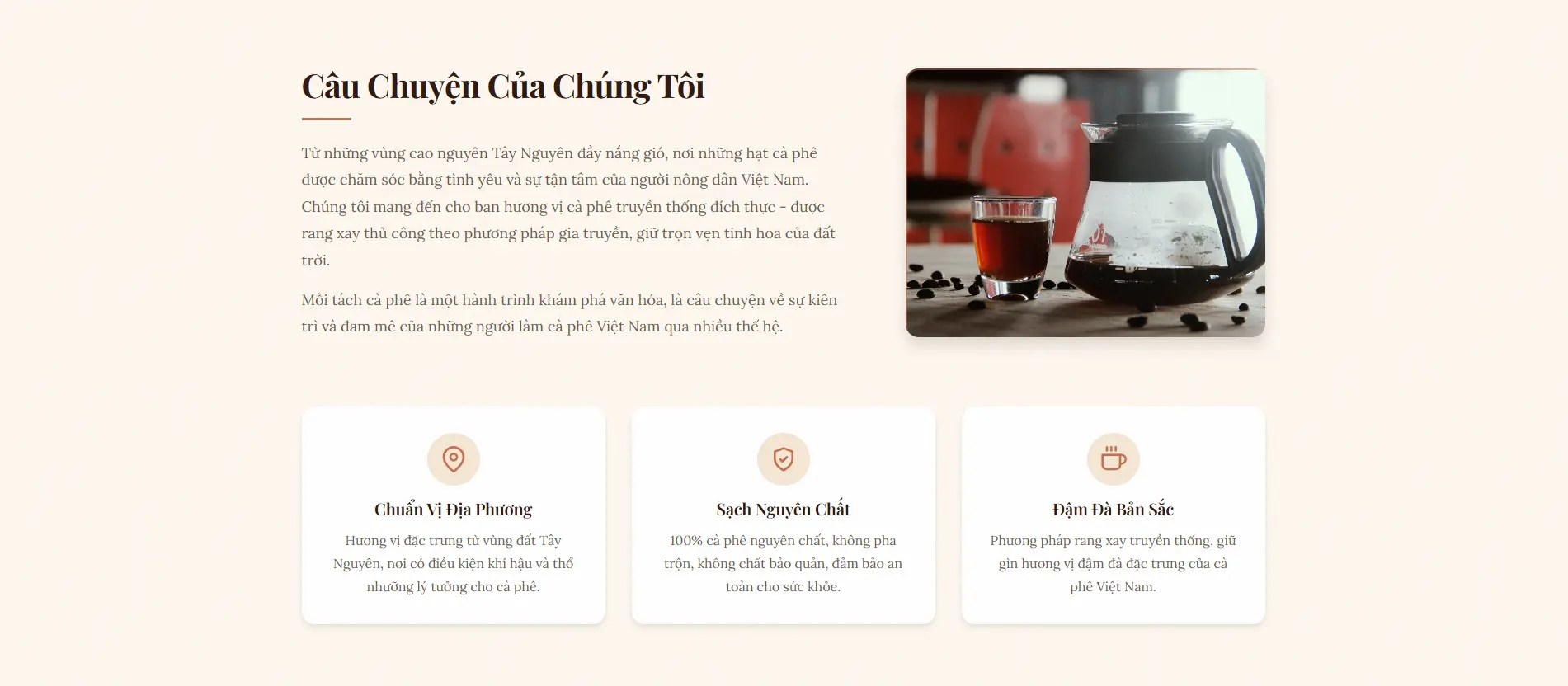
Story Section - Câu chuyện thương hiệu
Section giới thiệu câu chuyện thương hiệu với layout 2 cột, hình ảnh bên trái và nội dung bên phải. Animation fade-in khi scroll tạo cảm giác mượt mà.
Product Slider - Sản phẩm
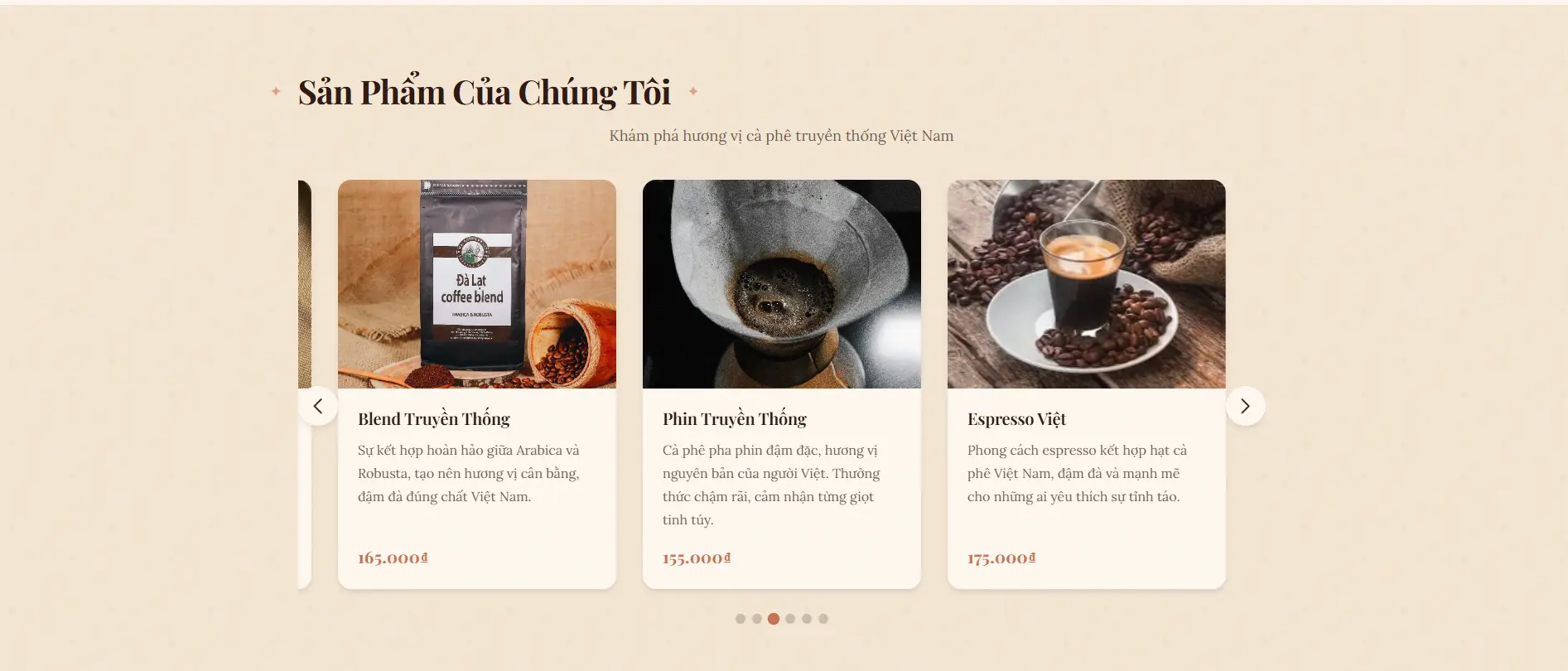
Slider sản phẩm với 6 loại cà phê, hiệu ứng hover zoom nhẹ và navigation dots. Responsive tự động điều chỉnh số sản phẩm hiển thị theo kích thước màn hình.
Contact Section - Liên hệ
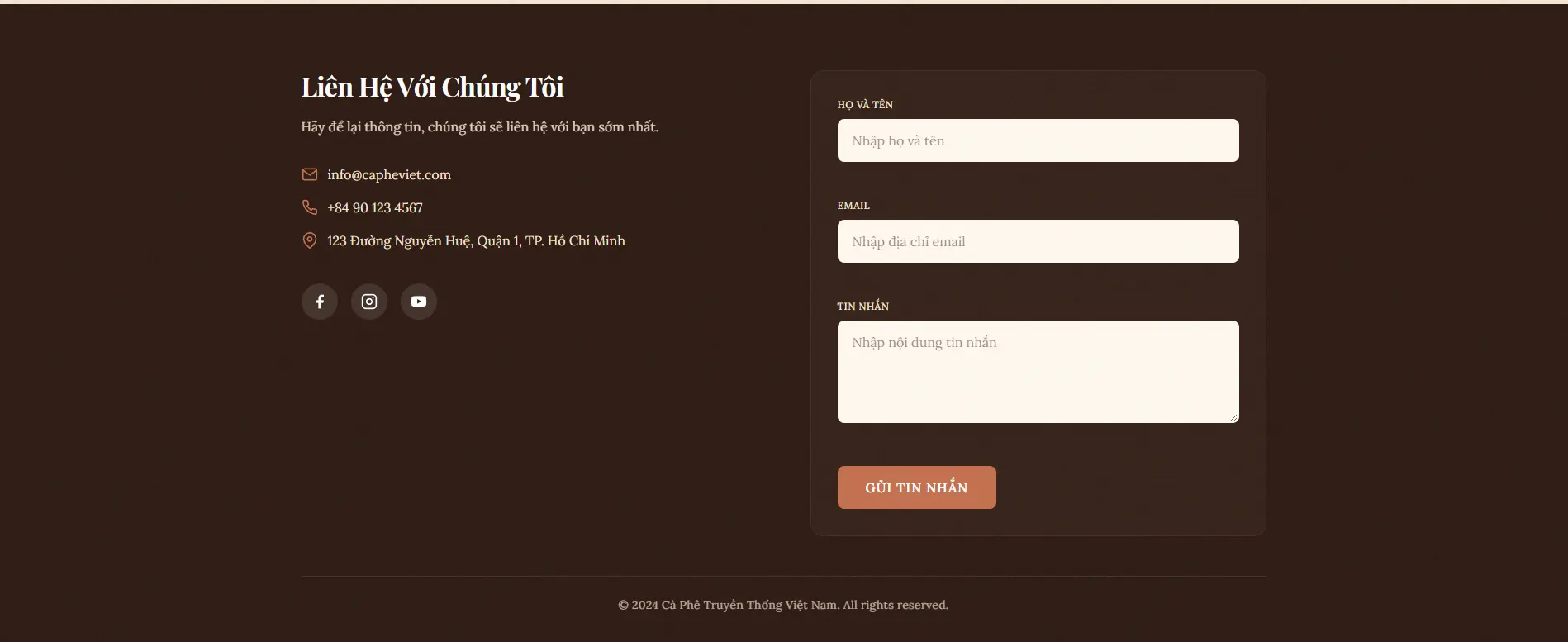
Form liên hệ với validation đầy đủ: kiểm tra email format, số điện thoại, và các trường bắt buộc. Thông báo lỗi hiển thị rõ ràng giúp người dùng dễ dàng sửa.
Bí quyết tạo website đẹp với AI
Tránh "AI Slop"
"AI Slop" là thuật ngữ chỉ những thiết kế generic, nhàm chán mà AI thường tạo ra. Để tránh điều này:
- Chọn font độc đáo: Tránh Inter, Roboto, Arial - chọn font có cá tính
- Bảng màu có điểm nhấn: Không dùng gradient tím trên nền trắng
- Layout sáng tạo: Asymmetry, overlap, diagonal flow
- Texture và depth: Thêm noise, gradient mesh, shadows
Commit to a Bold Direction
Chọn một hướng thiết kế rõ ràng và thực hiện triệt để:
- Brutally minimal: Tối giản đến cực đoan
- Maximalist chaos: Phong phú, nhiều chi tiết
- Retro-futuristic: Kết hợp cổ điển và hiện đại
- Organic/natural: Tự nhiên, mềm mại
Kiểm tra và tinh chỉnh
Sau mỗi task, luôn kiểm tra:
- Responsive trên mobile, tablet, desktop
- Animation có mượt không
- Form validation hoạt động đúng
- Hình ảnh load nhanh
Tổng kết
Với Kiro IDE và quy trình 7 bước trên, bạn hoàn toàn có thể tạo website chuyên nghiệp mà không cần kiến thức lập trình sâu. Điều quan trọng là:
- Chuẩn bị tốt: PRD và prompt thiết kế rõ ràng
- Kiên nhẫn: Thực hiện từng bước, kiểm tra kỹ
- Sáng tạo: Tìm hình ảnh đẹp, yêu cầu điều chỉnh phù hợp
- Học hỏi: Quan sát code AI tạo ra để hiểu thêm
Chúc bạn thành công với dự án của mình!
Có thể bạn quan tâm
- Tạo CV Chuyên Nghiệp Bằng AI với Claude và Overleaf - Hướng dẫn tạo CV thân thiện ATS miễn phí
- Hệ Thống Chấm Công Nhận Dạng Khuôn Mặt - Giải pháp chấm công AI cho doanh nghiệp
Câu hỏi thường gặp (FAQ)
Kiro IDE có miễn phí không?
Kiro IDE cung cấp credit miễn phí ban đầu (50-100 credit) đủ để tạo một website hoàn chỉnh. Bạn có thể đăng ký và bắt đầu sử dụng ngay mà không cần thanh toán.
Tôi có cần biết code để sử dụng Kiro IDE không?
Không cần. Kiro IDE được thiết kế để người không biết code vẫn có thể tạo website. Bạn chỉ cần mô tả ý tưởng bằng ngôn ngữ tự nhiên, AI sẽ tự động tạo code cho bạn.
Website tạo ra có responsive không?
Có, Kiro IDE tạo code với responsive design tự động. Website sẽ hiển thị tốt trên mọi thiết bị: desktop, tablet và mobile.
Tôi có thể tùy chỉnh thiết kế sau khi tạo không?
Hoàn toàn có thể. Bạn có thể yêu cầu AI điều chỉnh màu sắc, font chữ, layout, animation bất kỳ lúc nào bằng cách chat với AI.
Website tạo ra có thể deploy được không?
Có, code tạo ra từ Kiro IDE là production-grade code, có thể deploy lên Vercel, Netlify hoặc bất kỳ hosting nào hỗ trợ HTML/CSS/JS.
Blog
Related posts

2026-03-23
Codebase Prompt Enhancer: Cách Viết Prompt Code Bám Sát Codebase Hơn
Hướng dẫn dùng codebase-prompt-enhancer để biến prompt code chung chung thành prompt cụ thể, bám sát repository, giúp AI coding agent làm đúng hơn và ít lệch scope hơn.
Read post
2025-12-04
Tạo CV ATS Bằng AI Với Claude và Overleaf: Miễn Phí, Nhanh, Chuyên Nghiệp
Hướng dẫn tạo CV thân thiện ATS bằng Claude AI và Overleaf theo quy trình đơn giản, miễn phí và dễ chỉnh sửa cho sinh viên, developer và người đang tìm việc.
Read post
2025-11-29
Hệ Thống Chấm Công Nhận Dạng Khuôn Mặt Với FaceNet512 và RetinaFace
Giải pháp chấm công bằng nhận dạng khuôn mặt sử dụng FaceNet512 và RetinaFace, phù hợp cho doanh nghiệp cần tự động hóa attendance, tăng độ chính xác và hạn chế gian lận.
Read post