How to Build an AI Landing Page with Kiro IDE: A Practical Step-by-Step Guide
A practical guide to building a polished landing page with Kiro IDE and AI, from requirements and design prompts to implementation and refinement.
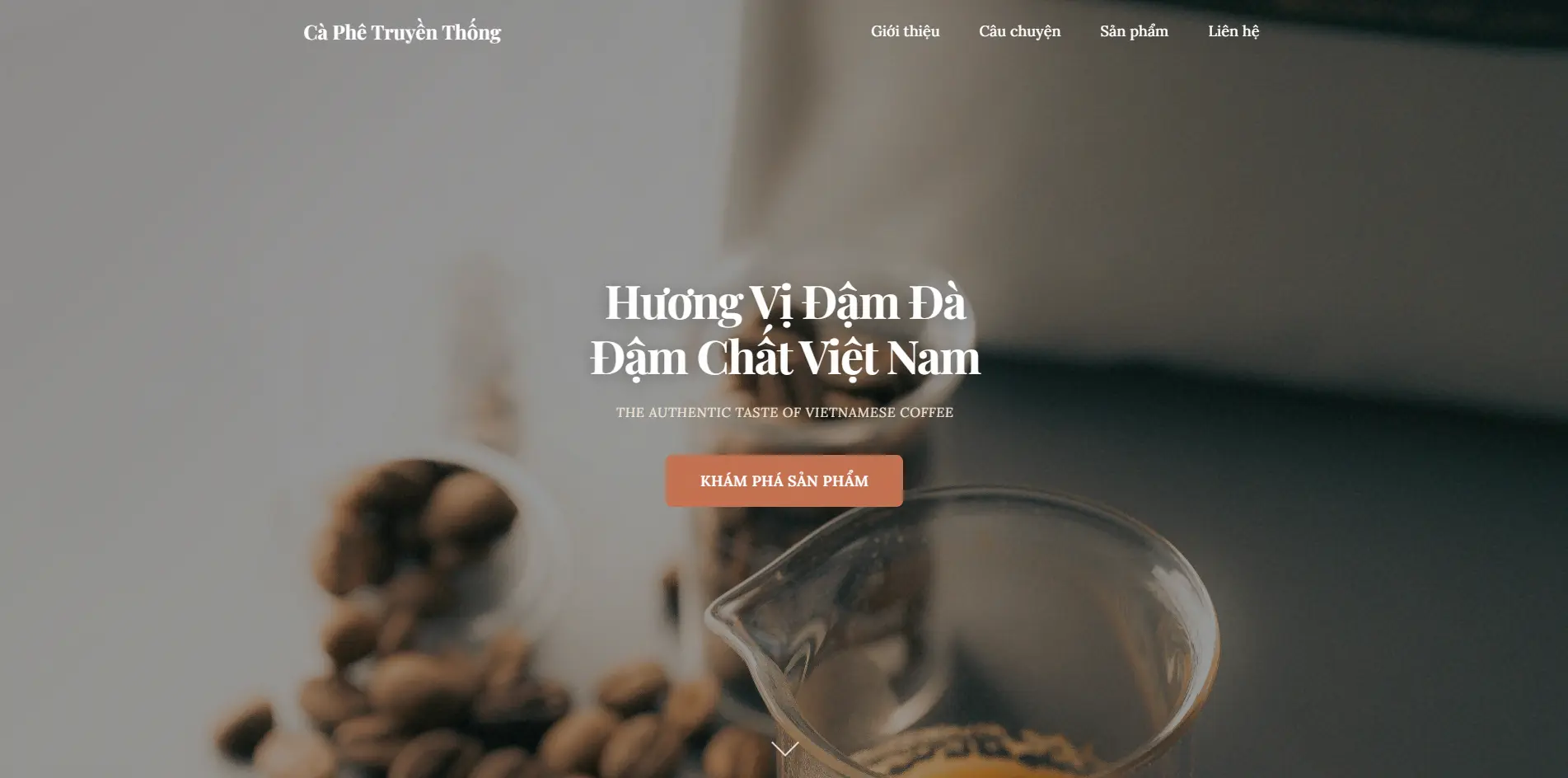
If you want to build a polished landing page without starting from a blank codebase, Kiro IDE is a useful workflow to try. It helps turn rough product ideas into a structured implementation process, which is especially valuable when you want speed without losing too much control over design quality and code quality.
What the final page included
The result was a landing page for a traditional Vietnamese coffee brand with:
- a visual hero section
- a brand story section
- a product slider
- a contact form
- responsive behavior across devices
- simple but refined motion
Why Kiro IDE works well
The main advantage is not just AI-assisted coding. It is the structured workflow around:
- requirements
- design
- tasks
- implementation
That structure makes it easier to keep the project focused and avoid low-quality one-shot output.
Step 1: Start with a clear PRD
Before generating anything, define:
- target audience
- main goal of the page
- unique selling points
- required sections
- content priorities
The more concrete the requirements are, the better the generated result becomes.
Step 2: Use a strong design prompt
AI tools often default to generic layouts. A good design prompt should define:
- visual tone
- spacing style
- typography direction
- level of motion
- what should feel distinctive
That helps the page feel intentional rather than generic.
Step 3: Create a spec in Kiro IDE
The most useful part of the workflow is building a spec first:
- define the requirements
- turn them into design decisions
- break the work into tasks
This makes the implementation easier to control.
Step 4: Implement incrementally
Once the tasks are ready, execute them in smaller steps:
- layout and structure
- design tokens and CSS
- interactivity
- testing and cleanup
This usually produces better results than trying to generate the full page in one pass.
Step 5: Add real assets
AI can help generate the interface, but the page still needs real images. For landing pages, strong visuals often improve perceived quality more than small code tweaks.
Step 6: Refine after the first draft
The first version is rarely the final one. After the initial build, refine:
- section order
- copy hierarchy
- CTA emphasis
- image choices
- responsive spacing
The best result usually comes from a few deliberate refinement rounds.
Key takeaway
AI works best when it is treated as part of a process instead of a one-shot generator. When requirements, design direction, and tasks are clear, the output becomes much easier to shape into a real product.
Frequently Asked Questions (FAQ)
Is Kiro IDE free?
Kiro IDE offers free credits (50-100 credits) to start, which is enough to create a complete website. You can sign up and start using it immediately without payment.
Do I need to know code to use Kiro IDE?
No, Kiro IDE is designed for non-coders. You just describe your idea in natural language, and AI will automatically generate the code for you.
Will the generated website be responsive?
Yes, Kiro IDE generates code with automatic responsive design. The website will display well on all devices: desktop, tablet, and mobile.
Can I customize the design after creation?
Absolutely. You can ask AI to adjust colors, fonts, layout, or animations at any time by chatting with the AI.
Can the generated website be deployed?
Yes, code generated from Kiro IDE is production-grade and can be deployed to Vercel, Netlify, or any hosting that supports HTML/CSS/JS.
Blog
Related posts

2026-03-23
Codebase Prompt Enhancer: How I Rewrite Coding Prompts to Fit the Repository Better
A practical look at why I built codebase-prompt-enhancer and how it helps turn vague coding prompts into repository-aware prompts that AI coding agents can execute more reliably.
Read post
2025-12-04
Create an ATS-Friendly CV with Claude and Overleaf
A practical workflow for creating a professional ATS-friendly CV with Claude AI and Overleaf, without relying on paid resume tools.
Read post
2025-11-29
Face Recognition Attendance System with FaceNet512 and RetinaFace
A practical attendance solution using face recognition, designed for production use with reliable detection, employee management, and reporting.
Read post